essay
Waitlist App: Features, Comparisons and What to Look For
February 24, 2026
Compare waitlist app features, automation options and workflows. Learn what to look for when choosing the right solution for your events or classes.
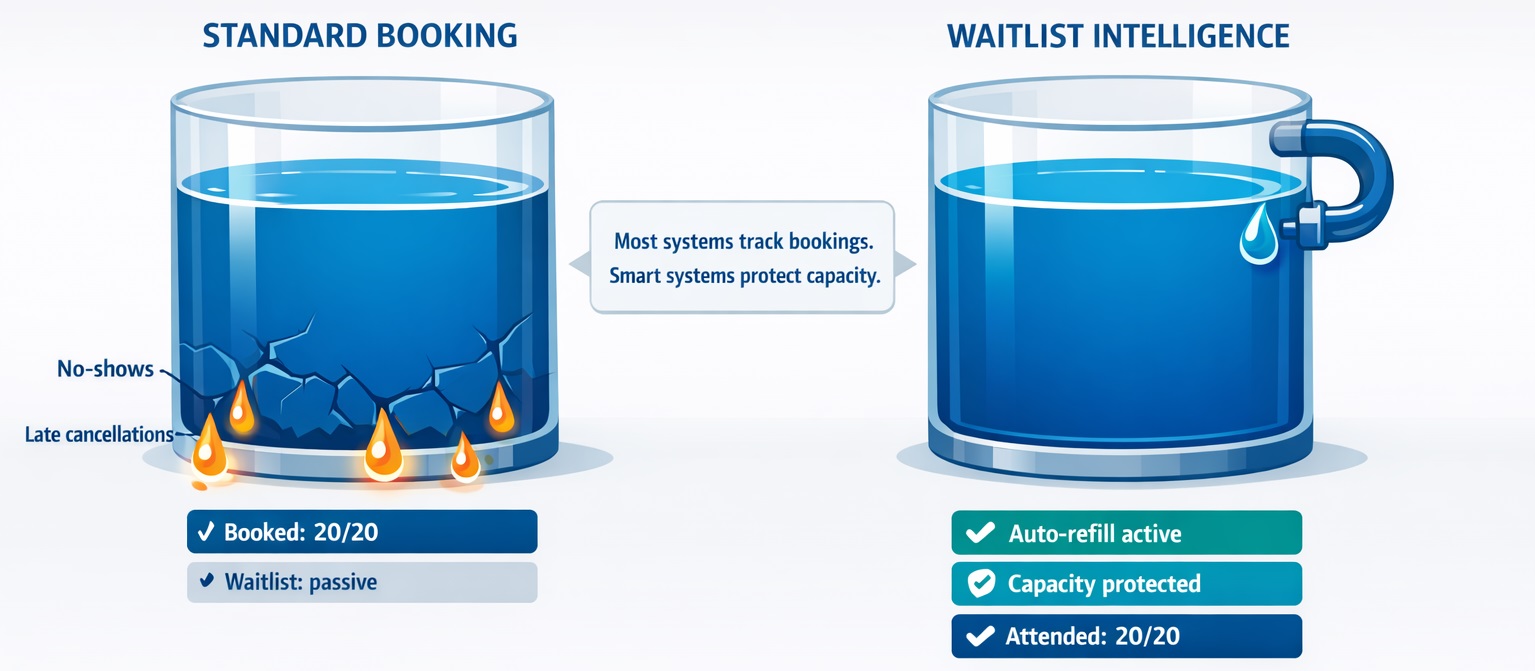
When an event shows as “full,” most organizers assume the capacity problem has been solved. In reality, this is often where capacity loss begins. Late cancellations and no-shows can reopen places that remain unused unless the booking process has a reliable way to refill them.
A modern waitlist app can help close that gap. But not every solution works the same way. Some simply collect names after an event fills up, while others actively help organizers offer newly available places, reduce manual administration and recover capacity that would otherwise be lost.
Free, but a real account (not just a demo). No Credit card needed.
If you are comparing waitlist apps, the important question is therefore not simply whether a platform includes a waiting list. The real question is what happens after somebody cancels, how much manual work remains for the organizer, and how effectively the system helps turn renewed availability into actual attendance.
What Is a Waitlist App?
A waitlist app is software that records demand after the available places for an event, class or session have been filled.
The simplest versions act like digital queues: people join a list and the organizer contacts them manually if a place becomes available.
More advanced solutions can take over part of that process by detecting cancellations, offering the released place to waiting participants and controlling how that offer is distributed.
This difference matters when comparing products. Two platforms may both advertise a waitlist feature while requiring very different amounts of work from the organizer.
What Should You Compare When Choosing a Waitlist App?
The most useful comparison starts with the workflow rather than the feature list. Ask what actually happens from the moment an event becomes full until a cancelled place is filled again.
Important criteria include:
- Automatic promotion: Can the system react automatically when somebody cancels?
- Offer-based booking: Can a released place be offered to somebody for a limited period instead of being assigned immediately?
- Queue rules: Can you control who receives the next opportunity?
- Multiple-session support: Can demand be handled across several dates, classes or sessions?
- Participant communication: Are notifications sent automatically?
- Organizer workload: How many manual steps remain when availability changes?
- Capacity visibility: Can you see not only bookings, but also waiting demand and released capacity?
A long feature list is less important than whether these functions work together as one usable workflow.
Simple Waitlist App vs. Automated Waitlist App
One of the most important distinctions when evaluating different tools is whether you need a simple queue or an automated refill process.
A simple waitlist may be enough if:
- You run only a few events
- Cancellations are uncommon
- You know most participants personally
- Manual messaging takes very little time
- Leaving an occasional place empty has little business impact
An automated solution becomes more valuable if:
- Your events frequently sell out
- Cancellations regularly occur
- You operate several sessions or classes
- People often want alternative dates
- Staff spend significant time contacting participants manually
- Empty places directly reduce revenue or utilization
This distinction is important because the cheapest or simplest option is not automatically the most economical one. If staff must repeatedly check cancellations, contact several people and update bookings by hand, the real cost of the system includes that administrative work.
Waitlist App vs. Free Scheduling Tools
Free scheduling tools can be perfectly adequate when the main task is allowing people to select an available appointment or time slot. The limitations become more visible when demand exceeds capacity.
A typical scheduler can:
- Let users choose an available time
- Send booking confirmations
- Stop accepting reservations when capacity is reached
When comparing it with a dedicated waitlist workflow, check whether it can also:
- Accept demand after a session becomes full
- Detect newly available places
- Contact waiting participants automatically
- Control how long somebody has to accept an offer
- Move demand between alternative sessions
- Reduce the organizer's involvement in refilling capacity
If none of these are necessary, a simple scheduler may be sufficient. If recovering cancelled places is important, the comparison should focus less on appointment booking and more on what happens after capacity has already been reached.
For a broader comparison of these two categories, see: Free booking system vs. free scheduling app: what actually matters.
Which Waitlist Features Are Actually Worth Paying For?
Not every advanced feature is valuable for every organizer. The best option depends on where capacity is currently being lost.
Features with the clearest operational impact usually include:
- Automatic cancellation handling — reduces the need to monitor bookings manually
- Automatic invitations — avoids contacting waiting participants one by one
- Offer expiry — prevents one unresponsive person from blocking the queue
- Alternative-session handling — useful when participants are flexible about dates
- Clear waiting-list status — helps staff understand outstanding demand
- Configurable refill rules — important when different events require different booking logic
Before paying for a more advanced product, identify which manual process it is replacing. If you cannot point to a recurring administrative problem or measurable capacity loss, the additional functionality may not yet be necessary.
Who Benefits Most From a Waitlist App?
Waitlist functionality becomes especially valuable where capacity is limited but attendance changes frequently.
Common use cases include:
- Education and training programs
- Workshops and courses
- Therapy and support groups
- Family activities
- Fitness classes and studios
- Sports programs
- Cohort-based programs
- Events with fixed participant limits
The stronger the combination of limited capacity, high demand and frequent changes, the greater the potential value of automating the refill process.
Family programs are one example where booking decisions may involve several people and plans can change late.
Questions to Ask Before Choosing a Waitlist App
Before selecting a platform, test the actual operational scenarios you expect to encounter.
- What happens immediately after somebody cancels?
- Does the organizer have to notice the cancellation first?
- Who receives the newly available place?
- Is the place assigned automatically or offered first?
- What happens if the first person does not respond?
- Can participants wait for more than one suitable session?
- Can you use different rules for different types of events?
- How much manual communication remains?
- Can staff clearly see both confirmed bookings and unmet demand?
- Can the workflow scale if the number of events increases?
These questions often reveal more than a standard software comparison table. A product may technically include all the expected features while still leaving the difficult parts of the process to the organizer.
When Is a Basic Waitlist Not Enough?
A basic queue becomes limiting when collecting names is no longer the main problem.
For example, imagine a class with 20 places and 12 people waiting. Two confirmed participants cancel the evening before the event.
A passive system tells you that twelve people are interested. It does not necessarily solve the next questions:
- Who should receive the available places?
- Should both people be contacted simultaneously?
- How long should they have to respond?
- What happens if neither accepts?
- Should the next people automatically receive an offer?
- What if somebody would prefer another session?
This is where the practical difference between products becomes much more important than whether there is a checkbox labelled “waitlist.”
What More Advanced Waitlist Apps Do Differently
More advanced platforms treat a waiting list as part of the booking workflow rather than as a static database of names.
Depending on the product, this may include:
- Automatic waitlist promotion after cancellations
- Time-limited offers for released places
- Different refill rules for different event types
- Multi-session handling when participants have several acceptable options
- Automated notifications throughout the process
- Better visibility into remaining demand
The commercial value is straightforward: the more of this process the system can handle reliably, the less staff time is needed to protect the same amount of capacity.
How to Evaluate the Cost of a Waitlist App
Price should not be evaluated in isolation. Compare the subscription cost with the operational cost of the process you use today.
Consider:
- How often cancellations occur
- How many places remain unfilled after cancellations
- How much one occupied place is worth
- How much staff time is spent managing waiting participants
- How many messages are sent manually
- Whether the administrative burden grows as demand increases
A free tool can be the better choice for a low-volume organizer. For a business running many full sessions, however, a paid system that recovers more places or removes repetitive administration may have the lower real cost.
What Type of Waitlist App Should You Choose?
The right category depends mainly on the complexity of your operation.
- Choose a basic queue if you mainly need to collect names after an event fills.
- Choose a notification-based solution if cancellations are frequent and manual outreach is becoming inconvenient.
- Choose an automated refill workflow if protecting capacity is commercially important and you want the system to manage more of the process itself.
- Choose a multi-session solution if participants can attend several dates and you need to balance demand across them.
The best product is therefore not necessarily the one with the most features. It is the one that removes the specific operational bottleneck between a cancellation and the next participant actually taking that place.
Final Thought
If your events regularly show as full but actual attendance still fluctuates, comparing waitlist apps is worth doing before assuming that the problem is simply unavoidable.
Start by examining what happens after a cancellation. If your current process still requires somebody to notice the change, search through a queue, contact participants manually and wait for responses, there is significant room for automation.
A good waitlist app should do more than record excess demand. It should help convert that demand into occupied capacity with less manual work.
When comparing options, focus on that workflow first. The feature list, pricing model and interface matter, but the decisive question is simpler: when a place becomes available, how reliably does the system help you fill it?
Comments
Comments are shown after moderation, similar to a classic public blog.
0 comments
There are no approved comments yet.